MoreLogin is a powerful anti-detect (fingerprint) browser designed for multi-account management and privacy protection. It allows users to create multiple independent browser environments, each with a unique browser fingerprint, ensuring account security across different platforms.
MoreLogin + Jibao Proxy Configuration Guide
1、Get Proxy Information
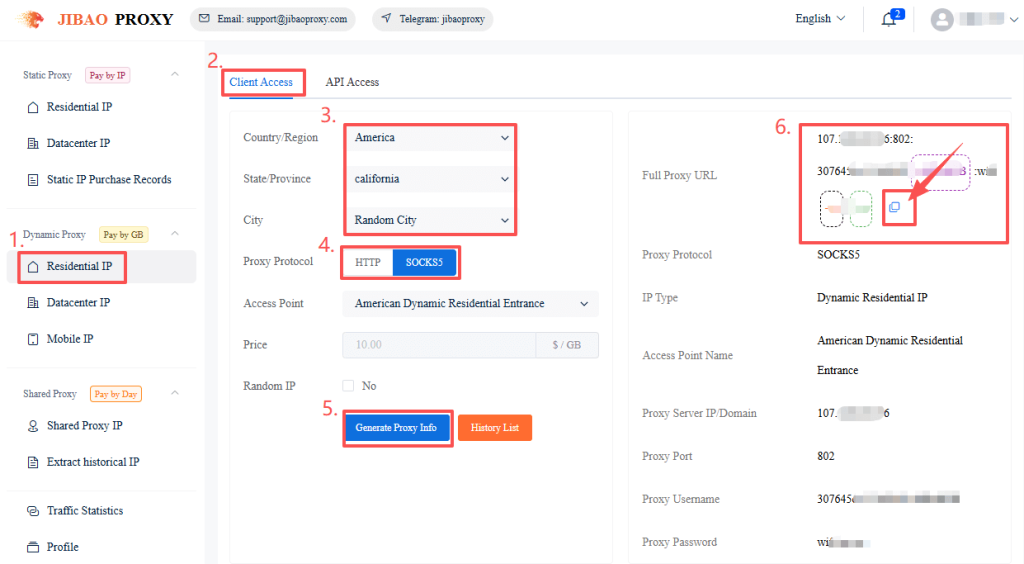
Before configuration, you need to obtain proxy IP details from Jibao Proxy.
If you don’t have an account yet, please register first (new users receive a 500MB trial balance).
After logging in, choose the appropriate proxy type and obtain the IP information.
- Dynamic Residential IP — Auto-rotating, ideal for web scraping
- Static Residential IP — Fixed high-anonymity proxy
- Dynamic Datacenter IP — High-speed rotating proxy
- Static Datacenter IP — Stable data center proxy
- Mobile IP — 4G/5G mobile proxy
- Shared Proxy IP — Budget-friendly option
The proxy format will be:
IP:Port:Username:Password
Username:Password@IP:Port
2、Configure Proxy in MoreLogin
Download and install MoreLogin, register an account, and log in to the client.
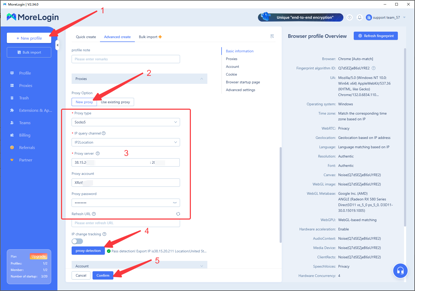
Click “New Profile” in the top-left corner → Select “New Proxy” → Choose Socks5 as the proxy type.
In the “Proxy Server” field, paste the proxy details copied from the Jibao Proxy dashboard (MoreLogin will automatically recognize and fill in the fields).
Click “Check Proxy” to test. Once successful, you will see detailed information about the IP.
Finally, click “Confirm”.
3、Launch the Browser
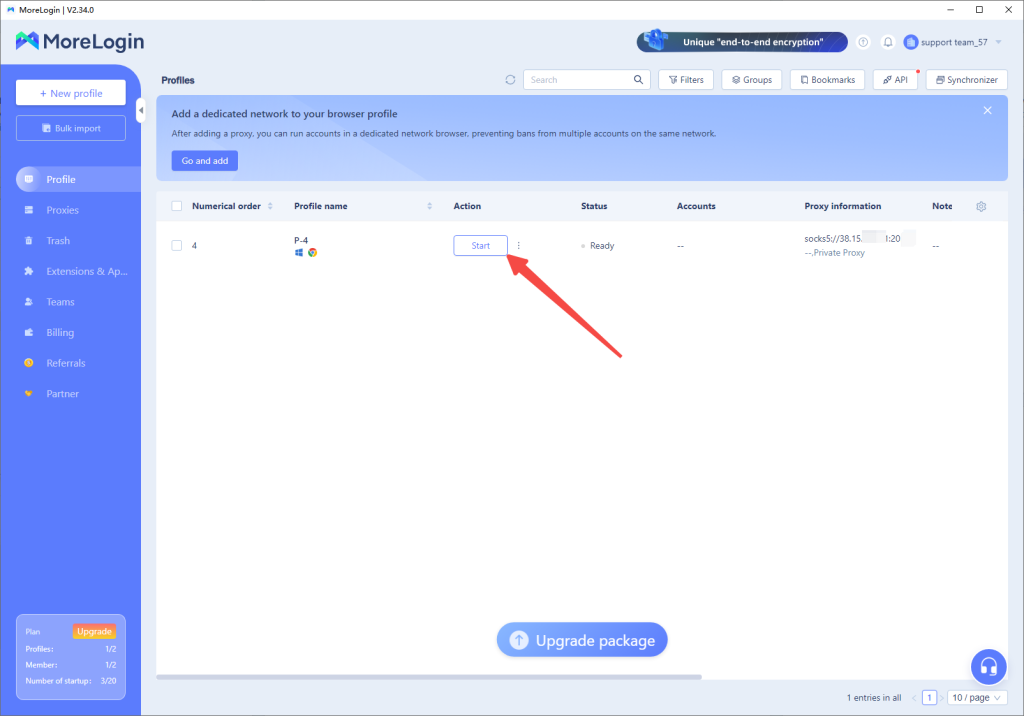
After clicking “Confirm”, you will be redirected to the main page.
Click “Start” to open the browser environment you just created.
4、Verify the Proxy
After entering the browser window, visit ipinfo.io to check the IP.
You will find that:
The IP quality is good
The speed test performs well
It meets the requirements of most business scenarios


 JIBAO PROXY

 English
 简体中文
简体中文 日本語
日本語 한국어
한국어 Español
 Français
 Русский
 العربية
 বাংলা
বাংলা فارسی
فارسی हिन्दी
 Filipino
 اردو
اردو Português
 ไทย
ไทย Tiếng Việt
 繁體中文
繁體中文
