1. Visit the JibaoProxy official website and register or log in to your account.
(New users receive $5 upon registration)
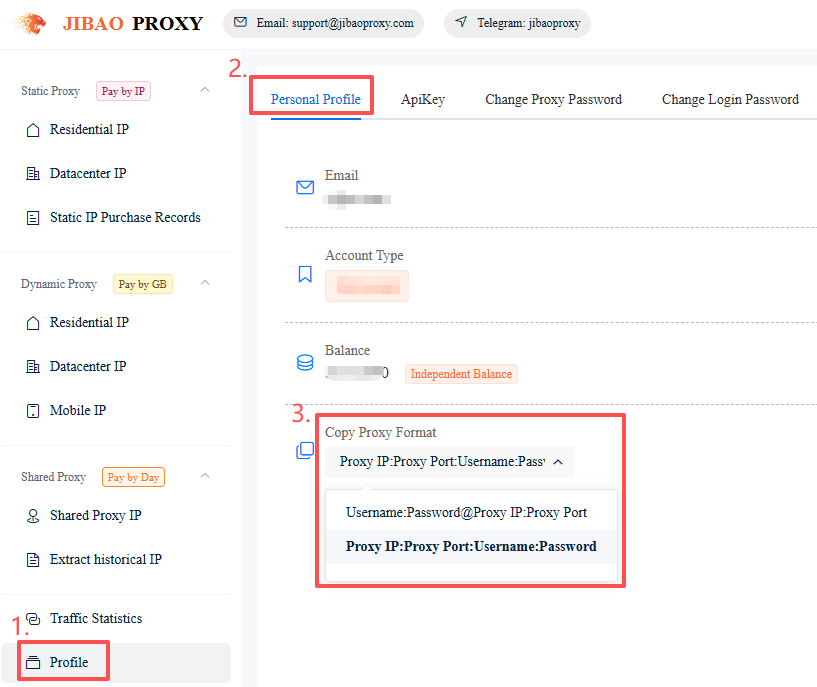
2. Select the proxy format:
Profile → Personal Profile → Copy Proxy Format → Select the required format.
The system will automatically save your selection.
① Proxy IP:Port:Username:Password
② Username:Password@Proxy IP:Port
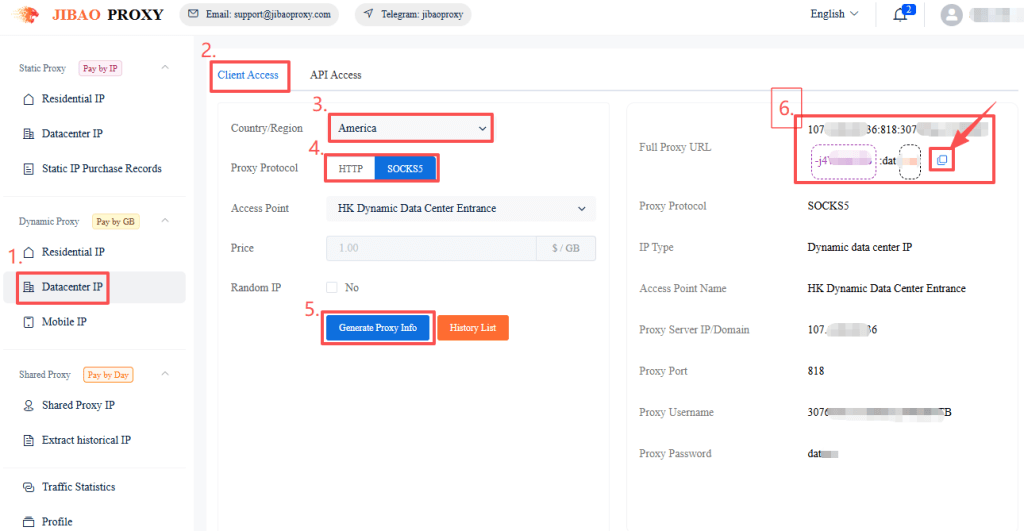
3. Obtain proxy IP details:
- Click “Dynamic Datacenter IP” on the left sidebar
- Select “Client Access”
- Choose region, proxy protocol, etc.
- Click “Generate Proxy Info”
- Copy the proxy details directly or from the History List
(Supports HTTP / SOCKS5)
How to Use Your Proxy #
Once you have obtained your proxy IP, configure it with your preferred tool:
- Browsers: Chrome Proxy Tutorial | Firefox Proxy Tutorial
- Antidetect Browsers: AdsPower | Multilogin | Bitbrowser | VMLogin | MuLogin | Kameleo | XLogin
- Mobile: Shadowrocket | V2RayNG | NeKoBox


 JIBAO PROXY

 English
 简体中文
简体中文 日本語
日本語 한국어
한국어 Español
 Français
 Русский
 العربية
 বাংলা
বাংলা فارسی
فارسی हिन्दी
 Filipino
 اردو
اردو Português
 ไทย
ไทย Tiếng Việt
 繁體中文
繁體中文
