1. Bisitahin ang opisyal na website ng JibaoProxy at magparehistro o mag-log in sa iyong account.
(Ang mga bagong user ay makakatanggap ng 500MB sa pagpaparehistro)

2. Piliin ang proxy format:
Profile → Personal Profile → Copy Proxy Format → Piliin ang kinakailangang format.
Awtomatikong ise-save ng sistema ang iyong pinili.
① Proxy IP:Port:Username:Password
② Username:Password@Proxy IP:Port
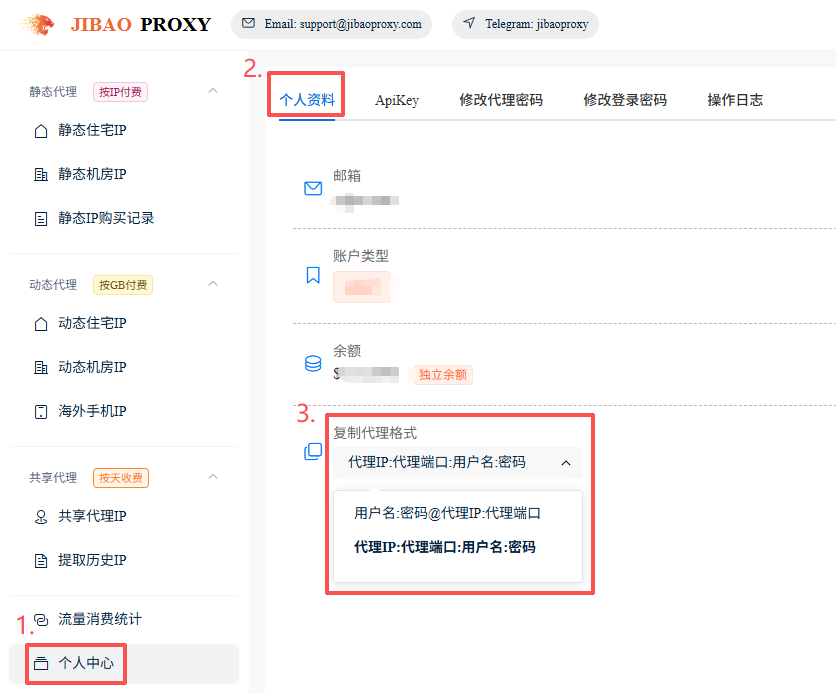
3. Kunin ang mga detalye ng proxy IP:
- I-click ang “Residential IP” sa kaliwang sidebar
- I-click ang “Purchase Static Residential IP”
- Piliin ang “Proxy Protocol” at “Region”, pagkatapos ay i-click ang “Search”
- Piliin ang “IP(s)” at “tagal ng paggamit”, pagkatapos ay i-click ang “Purchase”
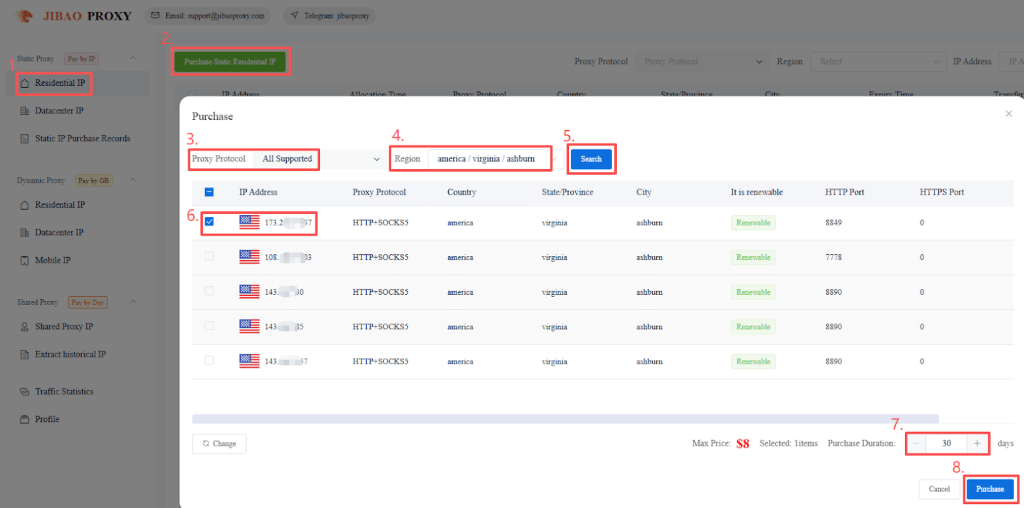
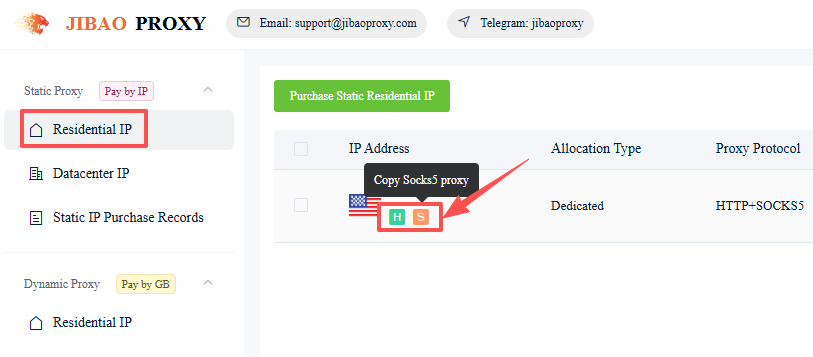
4. Kopyahin ang mga detalye ng biniling proxy:
- Pumunta sa “Residential IP” sa kaliwang sidebar
- I-click ang mga icon sa ibaba ng napiling IP upang kopyahin ang mga detalye ng proxy
(HTTP / HTTPS / SOCKS5)
Halimbawa:
137.1**.***.**9:1000:ls*****0:qQ******aq
Proxy IP:Port:Username:Password
How to Use Your Proxy #
Once you have your proxy IP, configure it with your preferred tool:
- Browsers: Chrome | Firefox
- Antidetect Browsers: AdsPower | Multilogin | Bitbrowser | VMLogin | MuLogin | Kameleo | XLogin
- Mobile: Shadowrocket | V2RayNG | NeKoBox


 JIBAO PROXY

 English
 简体中文
简体中文 日本語
日本語 한국어
한국어 Español
 Français
 Русский
 العربية
 বাংলা
বাংলা فارسی
فارسی हिन्दी
 Filipino
 اردو
اردو Português
 ไทย
ไทย Tiếng Việt
 繁體中文
繁體中文
